Calculator
>>> 1+2+3+4
10
# this is comment line intended for human
# python itself does not care what is written here
>>> 3 + 5.
8.0
# note .0 at the end, we are working with floating points now
Remember that simple math with integers can do arbitrary
precision
>>> 10**600 + 10**30 + 2*10**50
1000000000000000000000000000000000000000000000000000000000000000000000000000000000000000000000000000000000000000000000000000000000000000000000000000000000000000000000000000000000000000000000000000000000000000000000000000000000000000000000000000000000000000000000000000000000000000000000000000000000000000000000000000000000000000000000000000000000000000000000000000000000000000000000000000000000000000000000000000000000000000000000000000000000000000000000000000000000000000000000000000000000000000000000000000000000000000000000000000000000000000000000200000000000000000001000000000000000000000000000000
# unfortunately output does not fit on a slide
Variables and assignment operator
Very handy to use variables (i.e. aliases to numbers or other
values).
>>> a=345.23
>>> b=2.4
>>> a/b
143.84583333333336
Note that = reads as assign to be, it
is not an equality
>>> a=34
>>> b=11
>>> a=b
>>> # what is a? what is b?
>>> a
11
>>> b
11
Package import
As we discussed the advance math functions were afterthought for
Python. So we need to get them into context of the python execution. We
will use math library (collection of methods) which in
Python called module. We will use words: library, module,
or package interchangeably
>>> import math
# Above loads math library, or import it to Python context.
# Now we have many useful function, routines, and goodies.
# They will all start with `math.` So typing is a bit wordy
# e.g. `math.sin` instead of just `sin`
>>> math.pow(2,3)  # i.e. 2^3, we can get same result by 2**3
8.0  # note that math function works with floats even though 2 and 3 are integers
If you want to see what else is imported from math
module. Type math.<TAB> and see the choices.
Plotting
Another useful package which commonly used for plotting is matplotlib. There are others
but this one quite common.
In [1]: %matplotlib
Using matplotlib backend: qtagg

In [2]: import matplotlib.pyplot as plt
   ...: # note that we made an alias `plt` for `matplotlib.pyplot`
   ...: # so we can type less

In [3]: plt.plot([1,2,3,2,1])
Out[3]: [<matplotlib.lines.Line2D at 0x7f040c0a4a50>]
Lists and Arrays
What is [1,2,3,2,1]?
It is the list of numbers something which could be
assign to a variable and used letter
>>> x = [1, 2, 3, 2 , 1]
>>> plt.plot(x)
List can store anything, so it does not have to be just number it can
keep other things.
>>> y = [1, 2, "I am string", 33, 3]
>>> y
[1, 2, 'I am string', 33, 3]
But while it is very powerful idea, in numerical word the
array is more useful.
Array is the list of similar type objects, in our case numbers. Then
we are able to do operations on arrays in one go. But we need another
package: numpy.
Note: It is possible that we need to install numpy
separately. One of the ways:
>>> import numpy as np
>>> x=np.array([1,2,3,4])
>>> x
array([1, 2, 3, 4])
>>> x*3
array([ 3,  6,  9, 12])
>>> x+2*x
array([ 3,  6,  9, 12])
By the way, numpy also has math functions but it can do
a more powerful things
>>> x
array([1, 2, 3, 4])
>>> x**3
array([ 1,  8, 27, 64])
>>>
>>> y=[2, 3, 4, 1]
>>> x-y
array([-1, -1, -1,  3])
Data import and export
Typing arrays is quite error prone and besides programs need to
exchange data in a more efficient way.
Coma separated values (CSV) is quite good for it. It is not the most
storage efficient but it is human readable and many external tools
understand it.
Content of the file data_example.csv
col1, col2
1, 10
2, 12
3, 13
4, 14
5, 10
6, 12
7, 13
import numpy as np
data=np.loadtxt('data_example.csv', delimiter=',', skiprows=1)
import matplotlib.pyplot as plt
plt.plot(data, "o-")
plt.savefig("data_plot.png") # export our image in to the figure file in `png` format
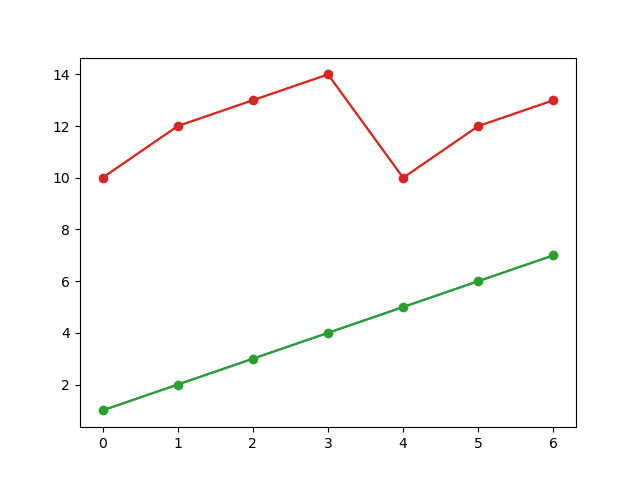
resulting plot in file
data_plot.png